Перейти к публикации
View in the app

A better way to browse. Learn more.

Дизайн и модификация Invision Community

A full-screen app on your home screen with push notifications, badges and more.

To install this app on iOS and iPadOS
  1. Tap the Share icon in Safari
  2. Scroll the menu and tap Add to Home Screen.
  3. Tap Add in the top-right corner.
To install this app on Android
  1. Tap the 3-dot menu (⋮) in the top-right corner of the browser.
  2. Tap Add to Home screen or Install app.
  3. Confirm by tapping Install.

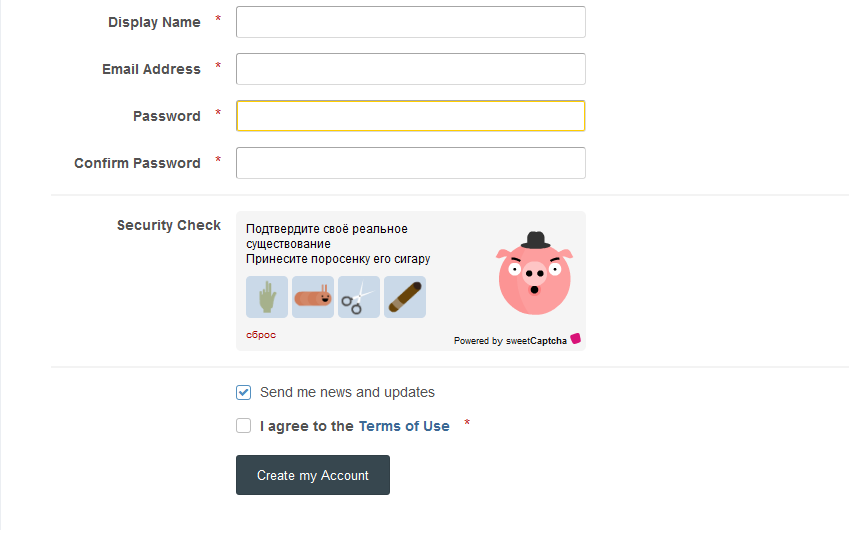
(SIV41) SweetCaptcha 1.0.0

1 скриншот

Обновления любимой всеми капчи SweetCaptcha для IPS Community Suite 4. Управления настройками капчи производится в настройках "Spam Prevention" где нужно выбрать тип и заполнить данные капчи.

Для установки загрузите содержимое папки upload в корень форума и установить плагин.

Отзывы пользователей

Рекомендованные комментарии

Ridli

Пользователи

Опубликовано:

Прикольная капча. Спасибо.

Configure browser push notifications

Chrome (Android)
  1. Tap the lock icon next to the address bar.
  2. Tap Permissions → Notifications.
  3. Adjust your preference.
Chrome (Desktop)
  1. Click the padlock icon in the address bar.
  2. Select Site settings.
  3. Find Notifications and adjust your preference.