Привет. Попробовал сегодня мультизагрузку файлов, а кроме таких ошибок ничего не загружается. Если же поодиночки файлы закидывать, то всё окей. В чём может быть причина? Подскажите пожалуйста.
При использовании данного сайта, вы согласаетесь с Условия использования и Чтобы сделать этот веб-сайт лучше, мы разместили cookies на вашем устройстве. Вы можете изменить свои настройки cookies, в противном случае мы будем считать, что вы согласны с этим..
Привет. Попробовал сегодня мультизагрузку файлов, а кроме таких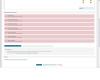 ошибок ничего не загружается. Если же поодиночки файлы закидывать, то всё окей. В чём может быть причина? Подскажите пожалуйста.
http://ubivaet.ru/index.php?showtopic=11
login - Guest
Password - Guest
А то так неудобно грузить по 30 файлов поодиночке....
Изменено пользователем Admin