Таблица лидеров
-
Lesovsky
IPB Skins Team1Баллы563Публикаций

Популярные публикации
Отображаются публикации с наибольшей репутацией на 07.05.2022 во всех областях
-
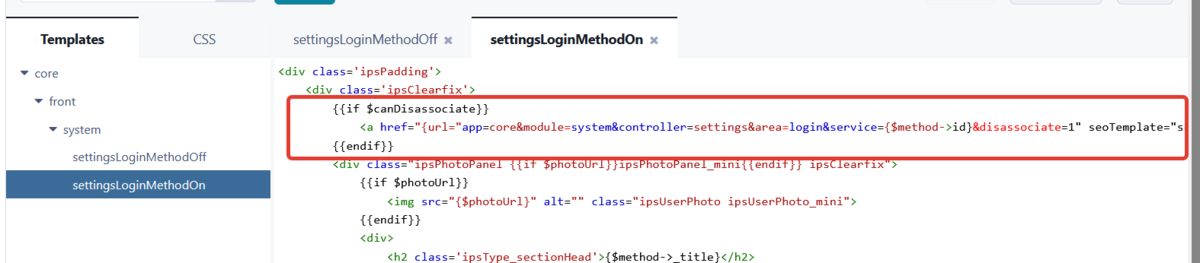
Здравствуйте! Найти: {{if $canDisassociate}} <a href="{url="app=core&module=system&controller=settings&area=login&service={$method->id}&disassociate=1" seoTemplate="settings_login" csrf="true"}" class="ipsButton ipsButton_negative ipsButton_small ipsPos_right" data-confirm data-confirmSubMessage="{lang="profilesync_sign_out_confirm" sprintf="$method->_title"}">{lang="sign_out"}</a> {{endif}} Заменить на: {{if $canDisassociate && $method->id != 9}} <a href="{url="app=core&module=system&controller=settings&area=login&service={$method->id}&disassociate=1" seoTemplate="settings_login" csrf="true"}" class="ipsButton ipsButton_negative ipsButton_small ipsPos_right" data-confirm data-confirmSubMessage="{lang="profilesync_sign_out_confirm" sprintf="$method->_title"}">{lang="sign_out"}</a> {{endif}} Где 9 - это id метода авторизации, можно посмотреть в АЦ (нажать кнопку Изменить напротив нужного метода авторизации и посмотреть значение параметра id в браузерной строке). А так конечно по-хорошему нужно переопределить метод disassociate у \IPS\Login\Handler с помощью плагина. Но ведь при желании пользователь сможет отключить авторизацию запретом доступа к приложению авторизации на самом сайте гугла.😉
 1 балл