Перейти к публикации
View in the app

A better way to browse. Learn more.

Дизайн и модификация Invision Community

A full-screen app on your home screen with push notifications, badges and more.

To install this app on iOS and iPadOS
  1. Tap the Share icon in Safari
  2. Scroll the menu and tap Add to Home Screen.
  3. Tap Add in the top-right corner.
To install this app on Android
  1. Tap the 3-dot menu (⋮) in the top-right corner of the browser.
  2. Tap Add to Home screen or Install app.
  3. Confirm by tapping Install.

Таблица лидеров

  1. Атаман

    IPB Skins.ru Team
    1
    Баллы
    2 922
    Публикаций

Популярные публикации

Отображаются публикации с наибольшей репутацией на 17.05.2024 во всех областях

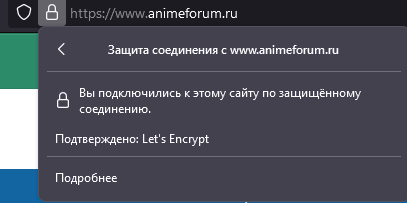
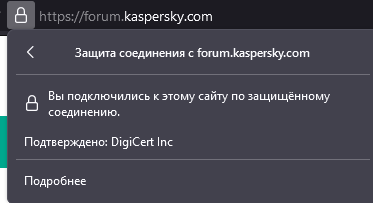
  1. Я уже дал ответ - у Вас Let`s Encrypt Бесплатный - https://letsencrypt.org/ru/docs/certificate-compatibility/ Известные несовместимые платформы Blackberry < v10.3.3 Android < v2.3.6 Nintendo 3DS Windows XP до SP3 не умеет работать с подписанными SHA-2 сертификатами Java 7 < 7u111 Java 8 < 8u101 Windows Live Mail (почтовый клиент от 2012, не веб-почта) не умеет работать с сертификатами без CRL Игровая консоль PS3 Игровая консоль PS4 с версией прошивки < 5.00 На форуме касперского платный SSL - https://www.digicert.com/
Configure browser push notifications

Chrome (Android)
  1. Tap the lock icon next to the address bar.
  2. Tap Permissions → Notifications.
  3. Adjust your preference.
Chrome (Desktop)
  1. Click the padlock icon in the address bar.
  2. Select Site settings.
  3. Find Notifications and adjust your preference.